- Feb 18, 2023
Strings Versus StringBuilders In C#
As a C# developer, your job is to create code that provides the best possible performance for your business or organization. And to do your job well, you’ll need a solid understanding of C# code optimization.
So let’s take a look at concatenating strings.
There are 3 ways you can add strings together in C#. Understanding the differences between these methods will help you pick the correct strategy for every occasion.
Check out the following code, this is an excerpt from a larger performance testing application:
public class StringsTest : PerformanceTest
{
    protected override bool MeasureTestA()
    {
        // string additions using regular string type
        var result = string.Empty;
        for (int i = 0; i < Iterations; i++)
        {
            result = result + '*';
        }
        return true;
    }

    protected override bool MeasureTestB()
    {
        // string additions using stringbuilder
        StringBuilder result = new StringBuilder(Iterations);
        for (int i = 0; i < Iterations; i++)
        {
            result.Append('*');
        }
        return true;
    }

    protected unsafe override bool MeasureTestC()
    {
        // fill string by using pointer operations
        var result = new char[Iterations];
        fixed (char* fixedPointer = result)
        {
            var pointer = fixedPointer;
            for (int i = 0; i < Iterations; i++)
            {
                *(pointer++) = '*';
            }
        }
        return true;
    }
}
The first method MeasureTestA declares an empty string and then keeps adding characters to the string in a simple loop, using the ‘+’ operator.
The second method MeasureTestB is a bit more refined. It sets up a StringBuilder instance and adds characters with the Append method.
The third method MeasureTestC goes all out. It sets up a character array, and then uses unsafe code to get a pointer to the memory location where the characters are stored. The loop writes new characters directly to memory while incrementing the pointer.
When I run this code, I get the following results:
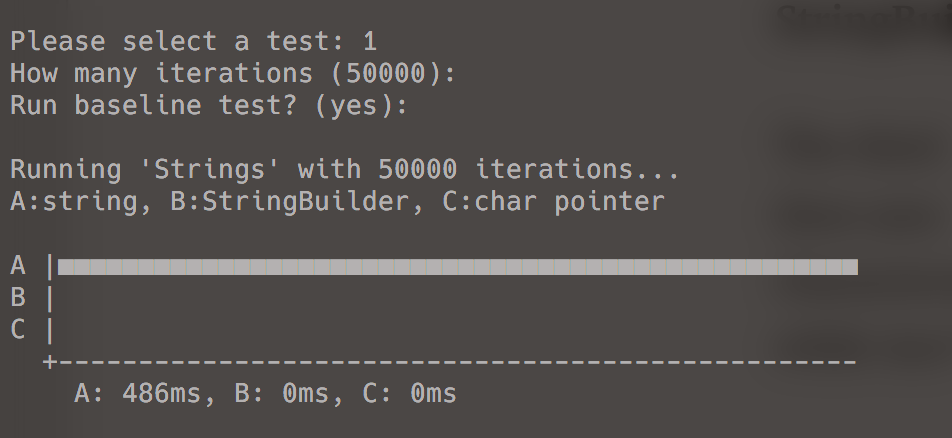
For 50,000 iterations, the regular string concatenation takes 486 milliseconds. But the stringbuilder and char pointer code don’t even show up! They are running in less than 1 millisecond.
This means that the regular string concatenation is at least 486 times slower than using a stringbuilder!
Let’s see what happens when I crank up the number of test iterations to 200,000:

Now the string code is 21,661 times slower than the stringbuilder!
Think about that next time you add lots of strings together in a hot code loop!
Now let’s see what happens when I skip the first test and crank up the number of test iterations to 50 million:
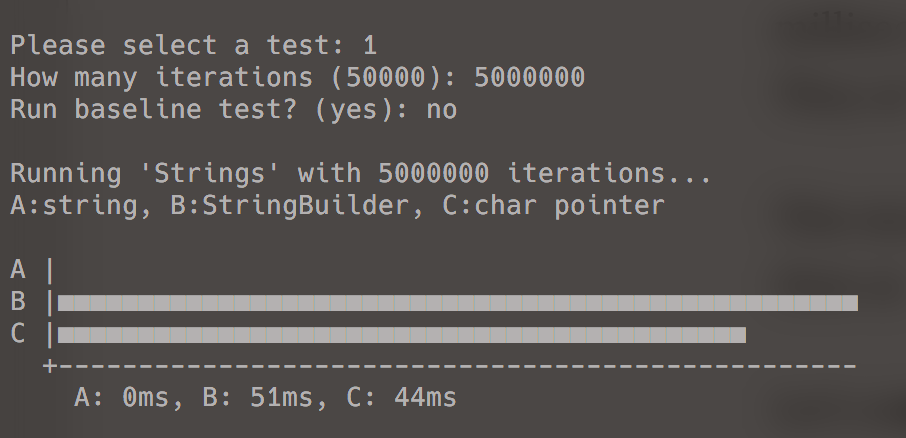
The stringbuilder code now runs in 51 milliseconds, and the char pointer code is 14% faster and runs in 44 milliseconds.
So why is this happening?
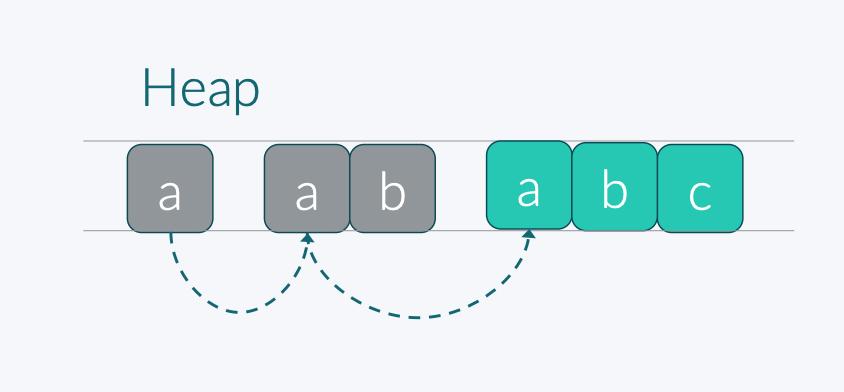
It’s because strings are immutable.
When you try to modify a string, the NET Framework creates an entirely new string from scratch and discards the original one.
So every time you add a character to a string, you’re actually recreating the entire string in memory, over and over again:
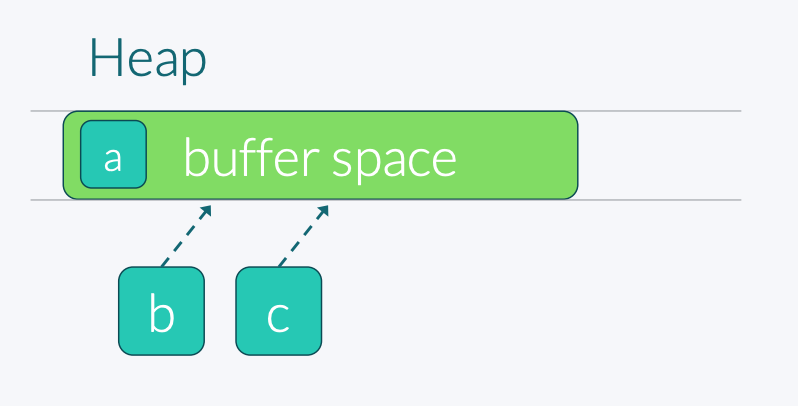
The StringBuilder works more like how you would expect. It sets up a buffer space in memory and then writes new characters directly into the buffer:
So I guess stringbuilders always outperform strings, right?
Well, actually, no.
The funny thing is that regular string concatenations are faster than using the stringbuilder, but only if you do a few of them at a time.
Check this out. I modified my code to test the performance of strings and stringbuilders for a whole range of Iterations values.
Here’s what I got:
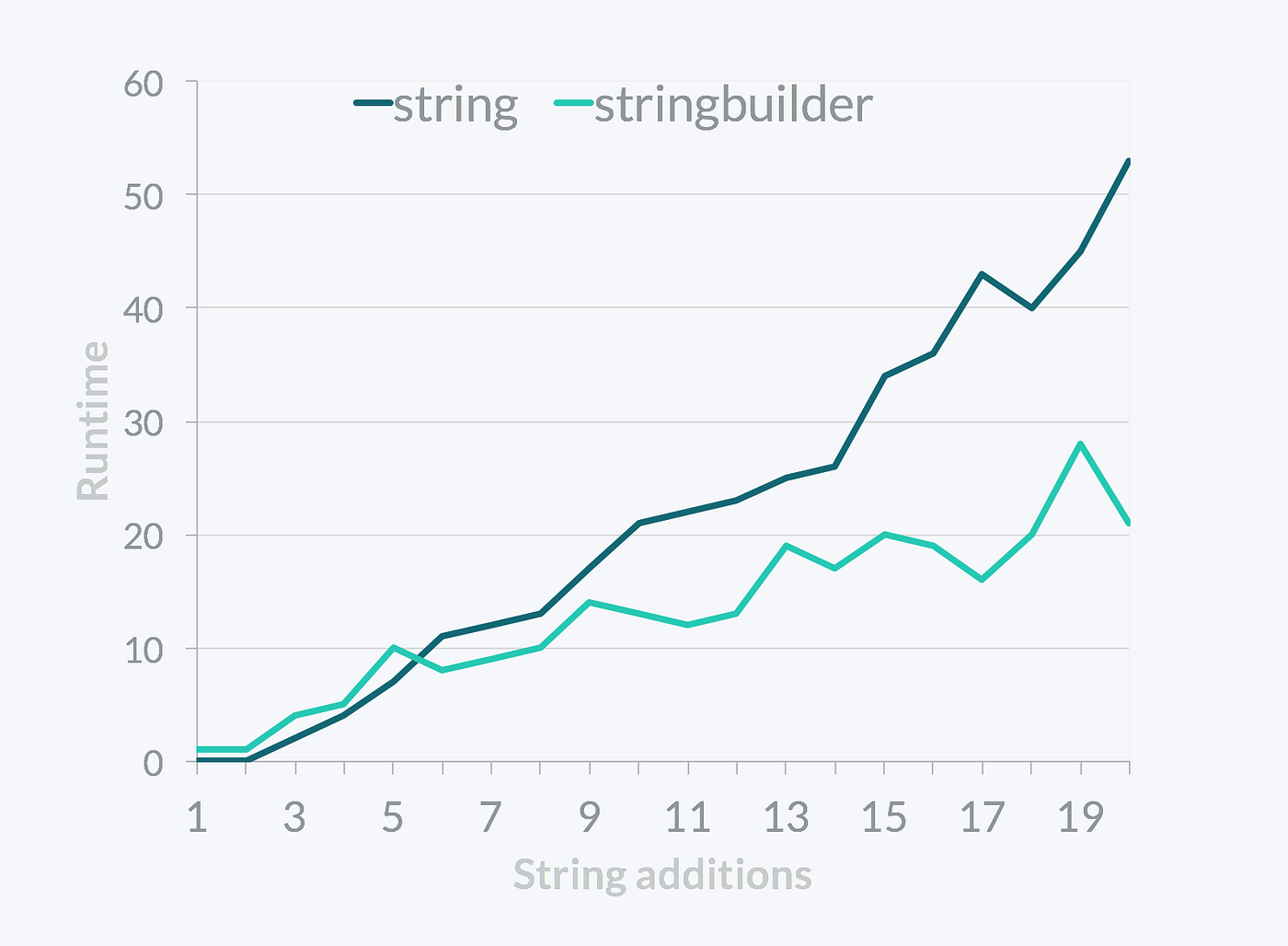
For less than 6 concatenations, using regular strings is actually faster than using stringbuilders!
The reason is that setting up the buffer space and then converting it back to a string introduces a bit of overhead. For a small number of concatenations, this overhead actually makes stringbuilders slower than the copy-by-value behavior of regular strings.
So don’t go replacing all strings with stringbuilders in your code.
Only look at hot loops where you’re adding strings together hundreds, thousands, or perhaps even millions of times.
Now let’s take a look at the MeasureTestC method that uses char pointers to write directly into memory.
Using pointers makes the entire assembly unsafe, which means I can’t use this code in a trusted environment anymore. That’s a big disadvantage.
However, using pointers directly introduces less overhead than going through the StringBuilder class, so I do get a 14% performance improvement.
And the difference gets larger when I increase the number of iterations. Here are the results with 500,000,000 iterations:

Now the pointer code is 24% faster than the stringbuilder!
So is it worth it to use pointers?
That’s for you to decide. If you need bleeding-edge performance and don’t mind having an unsafe assembly in your project, then go right ahead.
Pointers will give you the best possible performance in C# and bring your code on par with highly optimized C and C++ code.
There are many scenarios where this is definitely worth it.
Introduction To C# Performance Optimization
This benchmark is part of my online training course Introduction To C# Performance Optimization that teaches software developers how to speed up their C# code. The course will teach you how to apply performance tricks that every professional developer should know.
The course teaches the fundamentals of the .NET Framework, how to read Intermediate Language generated by the C# compiler, what the Garbage Collector does, how the stack and heap behave, what boxing is, and much more.
If you're interested in C# code optimization, then feel free to check out the course.
Featured Blog Posts
Check out these other blog posts that cover topics from my training courses.
Featured Training Courses
Would you like to learn more? Then please take a look at my featured training courses.
I'm sure I have something that you'll like.
MDFT Academy
- Community
Become a member and get access to every online training course on this site.
Would You Like To Know More?
Sign up for the newsletter and get notified when I publish new posts and articles online.
Let's stay in touch!