- May 24, 2023
Detect Gaze Angles With C#, DLib and OpenCV
A hot research area in computer vision is to build software that understands the human face. The most obvious application is Face Recognition, but we can also do lots of other cool stuff like Head Rotation Detection, Emotion Detection, Eye Gaze Detection, and Blink Detection.
The first step in building any face analysis app is to do Face Detection: scan an image and find all rectangular areas that contain a face.
Next is Landmark Detection: find and track predetermined locations on a face in real time, so that we can detect emotions or estimate head rotation.
With these two technologies I’m going to build an app that reads this image:

And tell me which face is looking directly at the camera.
If you want to copy and run my code, save this image as ‘input.jpg’ and put it in your project folder.
My app will use C#, Dlib, DlibDotNet, OpenCvSharp4, and NET Core v3, and I’ll try to achieve my goal with the minimum of code.
Dlib is the go-to library for face detection. It’s intended for C and C++ projects, but Takuya Takeuchi has created a NuGet package called DlibDotNet that exposes the complete Dlib API to C#.
OpenCvSharp4 is a C# wrapper for the famous OpenCv computer vision library. I’ll use it to perform the complex matrix algebra I’ll need to calculate the head rotation for each face in the image.
And NET Core is the Microsoft multi-platform NET Framework that runs on Windows, OS/X, and Linux. It’s the future of cross-platform NET development.
Let’s get started. Here’s how to set up a new console project in NET Core:
$ dotnet new console -o HeadTracking
$ cd HeadTracking
Next, I need to install the packages I need:
$ dotnet add package DlibDotNet
$ dotnet add package OpenCvSharp4
$ dotnet add package OpenCvSharp4.runtime.win
This will install DlibDotNet and OpenCvSharp4 for Windows.
When you’re running these commands you may get a warning that OpenCvSharp4 has been compiled for the NET Framework v4.6.1 and might not work in NET Core v3. Don’t worry about this, the code will run fine.
If you’re running on Linux, replace the last package with this:
$ dotnet add package OpenCvSharp4.runtime.ubuntu.18.04-x64Now I’m ready to add some code. Here’s what Program.cs should look like:
using System;
using System.Linq;
using DlibDotNet;
using Dlib = DlibDotNet.Dlib;
using OpenCvSharp;

namespace HeadTracking
{
    /// <summary>
    /// The main program class
    /// </summary>
    class Program
    {
        // file paths
        private const string inputFilePath = "./input.jpg";

        /// <summary>
        /// The main program entry point
        /// </summary>
        /// <param name="args">The command line arguments</param>
        static void Main(string[] args)
        {
            // set up Dlib facedetectors and shapedetectors
            using (var fd = Dlib.GetFrontalFaceDetector())
            using (var sp = ShapePredictor.Deserialize("shape_predictor_68_face_landmarks.dat"))
            {
                // load input image
                var img = Dlib.LoadImage<RgbPixel>(inputFilePath);

                // find all faces in the image
                var faces = fd.Operator(img);
                foreach (var face in faces)
                {
                    // find the landmark points for this face
                    var shape = sp.Detect(img, face);

                    // the rest of the code goes here....
                }

                // export the modified image
                Dlib.SaveJpeg(img, "output.jpg");
            }
        }
    }
}
The Dlib.GetFrontalFaceDetector method loads a face detector that’s optimized for frontal faces: people looking straight at the camera.
And ShapePredictor.Deserialize loads a 68-point configuration file for Dlib’s built-in landmark detector and initializes it. You can download this file here.
The Dlib.LoadImage<RgbPixel> method loads the image in memory with interleaved color channels. The fd.Operator method find all faces in the image and sp.Detect detects all landmark point for each face.
To detect head rotation, I’m going to use a neat trick. I will construct a 3D head model of key landmark points, like this:
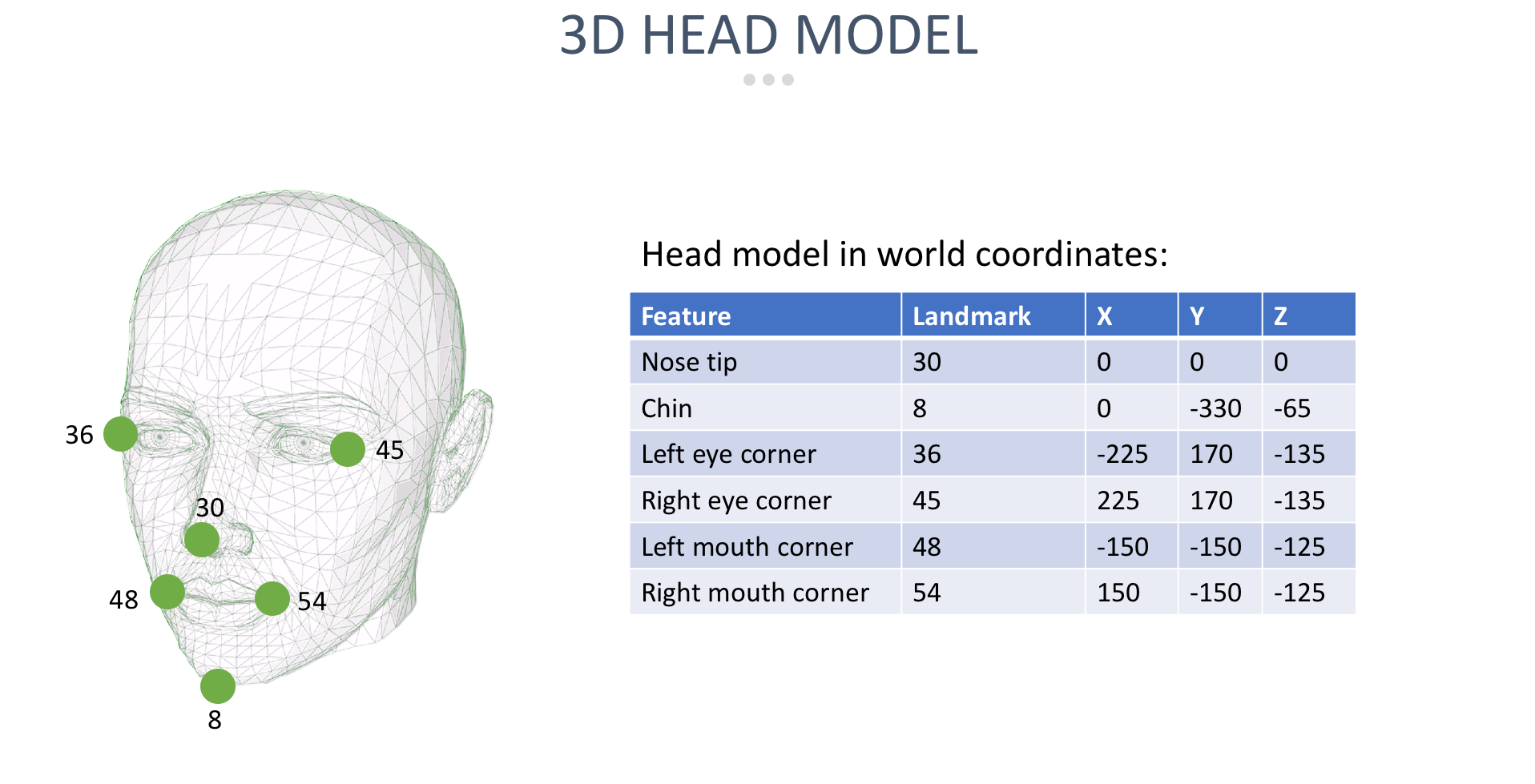
I don’t need a lot of landmark points to track head rotation. Just the points 30, 8, 36, 45, 48, and 54 will do. The table shows these landmark points and their corresponding coordinates in 3D. I call these 3D-coordinates the world coordinates.
Note that this 3D world coordinate space is completely arbitrary. I placed the tip of the nose at (0,0,0) and just guessed where the other points would be, relative to this origin. The scale of the x-, y- and z-axis is also completely arbitrary.
Now think about this — I’ve got a 3D model of a face consisting of 6 landmark points in (x,y,z) world coordinates. I also have the 2D (x,y) coordinates where the landmark points were detected on the image.
These 2D coordinates are a projection of the 3D face to 2D, because the camera projects 3-dimensional faces to 2-dimensional images.
And OpenCV has a very nice method called SolvePnP that can estimate the exact rotation angles that would lead to the 3D face to appear like it does in 2D on the image.
Here’s what that looks like in code. I’ll start by setting up the 3D face model in world coordinates and get the corresponding 2D landmark point coordinates:
// build the 3d face model
var model = Utility.GetFaceModel();

// get the landmark point we need
var landmarks = new MatOfPoint2d(1, 6,
    (from i in new int[] { 30, 8, 36, 45, 48, 54 }
     let pt = shape.GetPart((uint)i)
     select new OpenCvSharp.Point2d(pt.X, pt.Y)).ToArray());

// the rest of the code goes here....
I’m using a handy Utility class that abstracts some of the more complex calculations away. You can download the class here.
This code will load the 3D face model in world coordinates in the model variable, and the 2D landmark point coordinates in landmarks.
Now I’m ready to call the SolvePnP method:
// build the camera matrix
var cameraMatrix = Utility.GetCameraMatrix((int)img.Rect.Width, (int)img.Rect.Height);

// build the coefficient matrix
var coeffs = new MatOfDouble(4, 1);
coeffs.SetTo(0);

// find head rotation and translation
Mat rotation = new MatOfDouble();
Mat translation = new MatOfDouble();
Cv2.SolvePnP(model, landmarks, cameraMatrix, coeffs, rotation, translation);

// find euler angles
var euler = Utility.GetEulerMatrix(rotation);

// the rest of the code goes here....
The SolvePnP method requires a camera calibration matrix and a coefficient matrix. The GetCameraMatrix method returns a quick-and-dirty calibration matrix that will work for any camera. And the coefficients can all be zero.
SolvePnP will find the rotation and translation that maps the 3D model onto the 2D projection, and fill the rotation and translation matrices. I’m not interested in translation so I’ll discard that matrix.
The rotation matrix has the angles I need, but they are in an arbitrary coordinate system (meaning the three axes point in arbitrary directions). To fix that and get meaningful rotation angles along the regular x-, y-, an z-axis, I need to call GetEulerMatrix.
Now I have pitch (up-down), yaw (left-right), and roll angles. I can process them like this:
// calculate head rotation in degrees
var yaw = 180 * euler.At<double>(0, 2) / Math.PI;
var pitch = 180 * euler.At<double>(0, 1) / Math.PI;
var roll = 180 * euler.At<double>(0, 0) / Math.PI;

// looking straight ahead wraps at -180/180, so make the range smooth
pitch = Math.Sign(pitch) * 180 - pitch;

// the yaw angle must be in the -25..25 range
// the pitch angle must be in the -10..10 range
if (yaw >= -25 && yaw <= 25 && pitch >= -10 && pitch <= 10)
    Dlib.DrawRectangle(img, face, color: new RgbPixel(0, 255, 255), thickness: 4);

// the rest of the code goes here....
The rotation matrix is in radians, so I’m converting everything back to degrees. And looking straight ahead is exactly where the pitch angle wraps at +180/-180, so I smooth that out by rotating the pitch angle by 180 degrees.
That leaves me with a pitch and yaw angle of exactly zero when the face is looking straight ahead. I draw a blue rectangle around the face when the pitch is in the -10…+10 range and the yaw in the -25…+25 range.
Now I’m going to draw a line on each face to illustrate the rotation angle:
// create a new model point in front of the nose, and project it into 2d
var poseModel = new MatOfPoint3d(1, 1, new Point3d(0, 0, 1000));
var poseProjection = new MatOfPoint2d();
Cv2.ProjectPoints(poseModel, rotation, translation, cameraMatrix, coeffs, poseProjection);

// draw a line from the tip of the nose pointing in the direction of head pose
var landmark = landmarks.At<Point2d>(0);
var p = poseProjection.At<Point2d>(0);
Dlib.DrawLine(
    img,
    new DlibDotNet.Point((int)landmark.X, (int)landmark.Y),
    new DlibDotNet.Point((int)p.X, (int)p.Y),
    color: new RgbPixel(0, 255, 255));

// the rest of the code goes here....
I start by adding a new point to the 3D word coordinate model: a point at (0,0,1000). In the world coordinate system, this point is floating in space directly in front of the nose.
Then I call ProjectPoints to project this point to 2D, using the same rotation and translation matrices calculated earlier. This means I now have (x,y) coordinates for this point that are compatible with the other landmark points.
So I can now call DrawLine and draw a line from the tip of the nose (landmark point 30) to this new point floating in in front of the nose.
Here’s what that looks like:

Note the blue line in the image. In world coordinates, this line extends from (0,0,0) to (0,0,1000). But because I’ve projected the line to 2D using the rotation and translation matrices, it now reflects the head rotation in the image.
To wrap up, I’ll add the code to draw the 6 landmark points in yellow:
// draw the key landmark points in yellow on the image
foreach (var i in new int[] { 30, 8, 36, 45, 48, 54 })
{
    var point = shape.GetPart((uint)i);
    var rect = new Rectangle(point);
    Dlib.DrawRectangle(img, rect, color: new RgbPixel(255, 255, 0), thickness: 4);
}
This code uses DrawRectangle to draw landmark points 30, 8, 36, 45, 48, and 54 on the image.
I can run my code like this:
$ dotnet runAnd here’s the output image:

It works! My app has correctly detected the face at the center of the image looking directly at the camera.
In some of the other faces you can see the yellow landmark points and the blue line indicating head rotation:

Note that not all faces could be detected. Face- and landmark detection only works when people look at the camera and tends to break down for large pitch and yaw angles.
Computer Vision With C#, OpenCV and DLib
I wrote this blog post as an experiment to see if I could create a Computer Vision training course in C#. The course would cover topics like object detection, object tracking, color processing, face detection and recognition, face swaps and much more. Throughout the course I would be building apps in C# and use OpenCV and DLib to perform all image transformations and object detection.
Is this something that would interest you? If so, let me know in the comments below this article and I'll consider building a C# computer vision course.
Featured Blog Posts
Check out these other blog posts that cover topics from my training courses.
Featured Training Courses
Would you like to learn more? Then please take a look at my featured training courses.
I'm sure I have something that you'll like.
MDFT Academy
- Community
Become a member and get access to every online training course on this site.
Would You Like To Know More?
Sign up for the newsletter and get notified when I publish new posts and articles online.
Let's stay in touch!